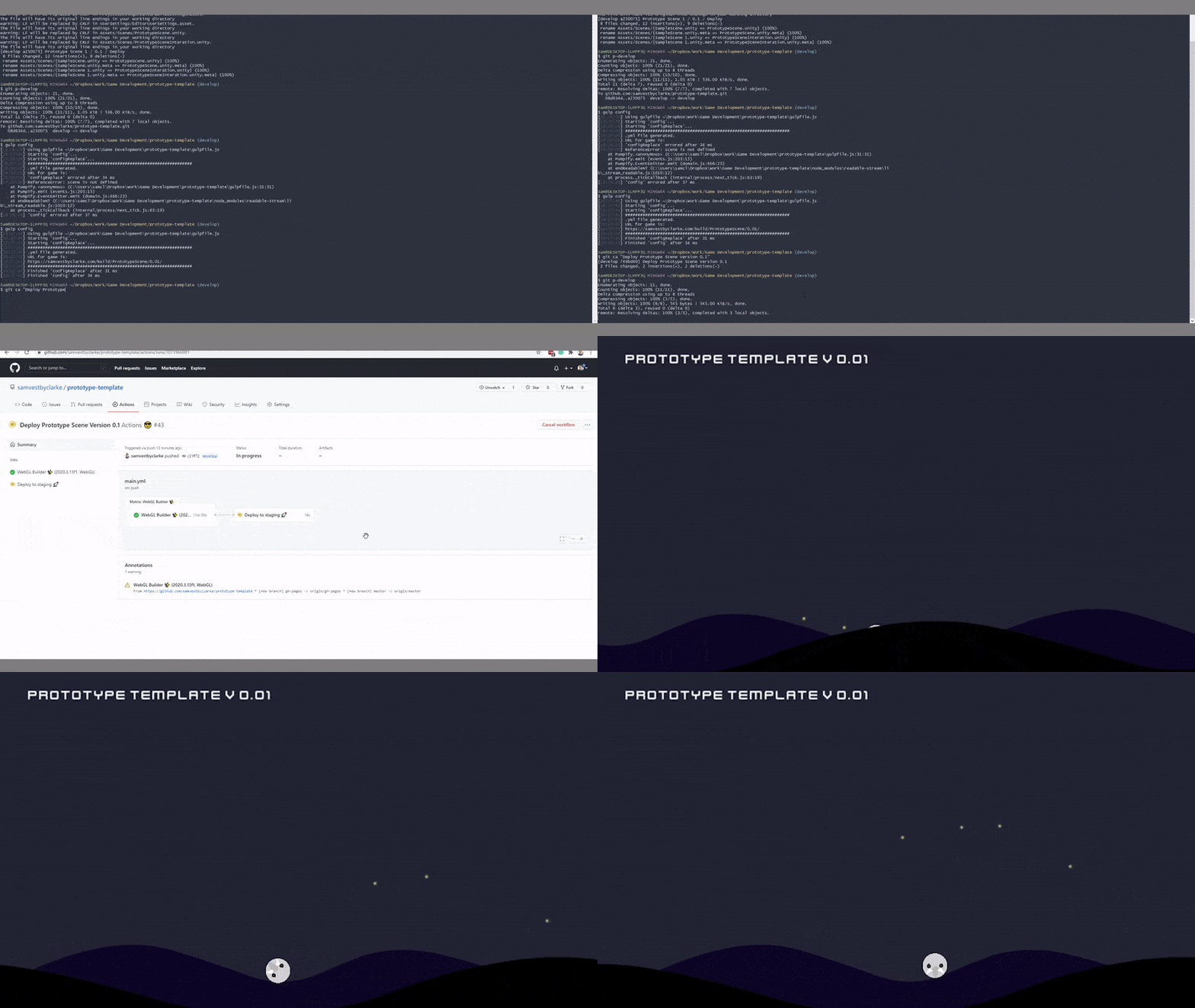
It's rapid ideation time again, with our second session spanning weeks eight and nine. This time around, the theme was set as:
The theme is to create a prototype that solves a problem in (your) daily life. If you worked solo in the previous RI, consider working in a team for this one for experience and fun.
First off, despite having the opportunity to work with one of my peers, I had to opt to work alone for this project again. I had to weigh up the benefit of collaborating vs my current schedule and decided that I couldn't guarantee I'd hit the show and tell session, and therefore it'd be fairer to work alone.
So to kick things off, the most important first step for me was to revisit my goals from the previous session and subsequent weeks. So let's break it down.
The goals - what did I want to do?
Each week, I aim to integrate the goals I set in week five's reflection (Vestby-Clarke, 2021). That's a given for every week, but I wanted to build on the previous rapid ideation session for this particular session (Vestby-Clarke, 2021). So let's take a look at the goals I set from this:
- Refine my workflow in Unity to speed up production.
- Study like I work - integrate proper project management consistently.
- Look at developing methods for integrating game feel ideas into an early prototype.
- Research experiential learning for gameplay tutorials further.
In addition to this, I had areas to research further to do with version control (Vestby-Clarke, 2021) and research & ethics (Vestby-Clarke, 2021), in particular, playtesting.
The playtest - parked but not forgotten!
A quick side-step here. In week eight, I identified wanting to design a playtest for my second rapid ideation artefact. Because of the nature of the prototype I ended up building, this was not actually possible in this instance. However, crucially what I have built will aid me in playtesting in future, so I am now more equipped with tools to playtest and rapidly prototype in Unity faster.
What have I done to integrate better project management?
Quite simply here, I've started studying as I work. I was slotting my studies in here and there (partly due to the travelling I have been doing for a month now), and so that needed to change.
I've been using Kanban boards and agile methodology since the start of the course, but a few tweaks have drastically improved my time utilisation. I'm using Google calendar to timebox my study work properly, and my output has been a lot more productive.
Ideation - feeding the goals into my idea
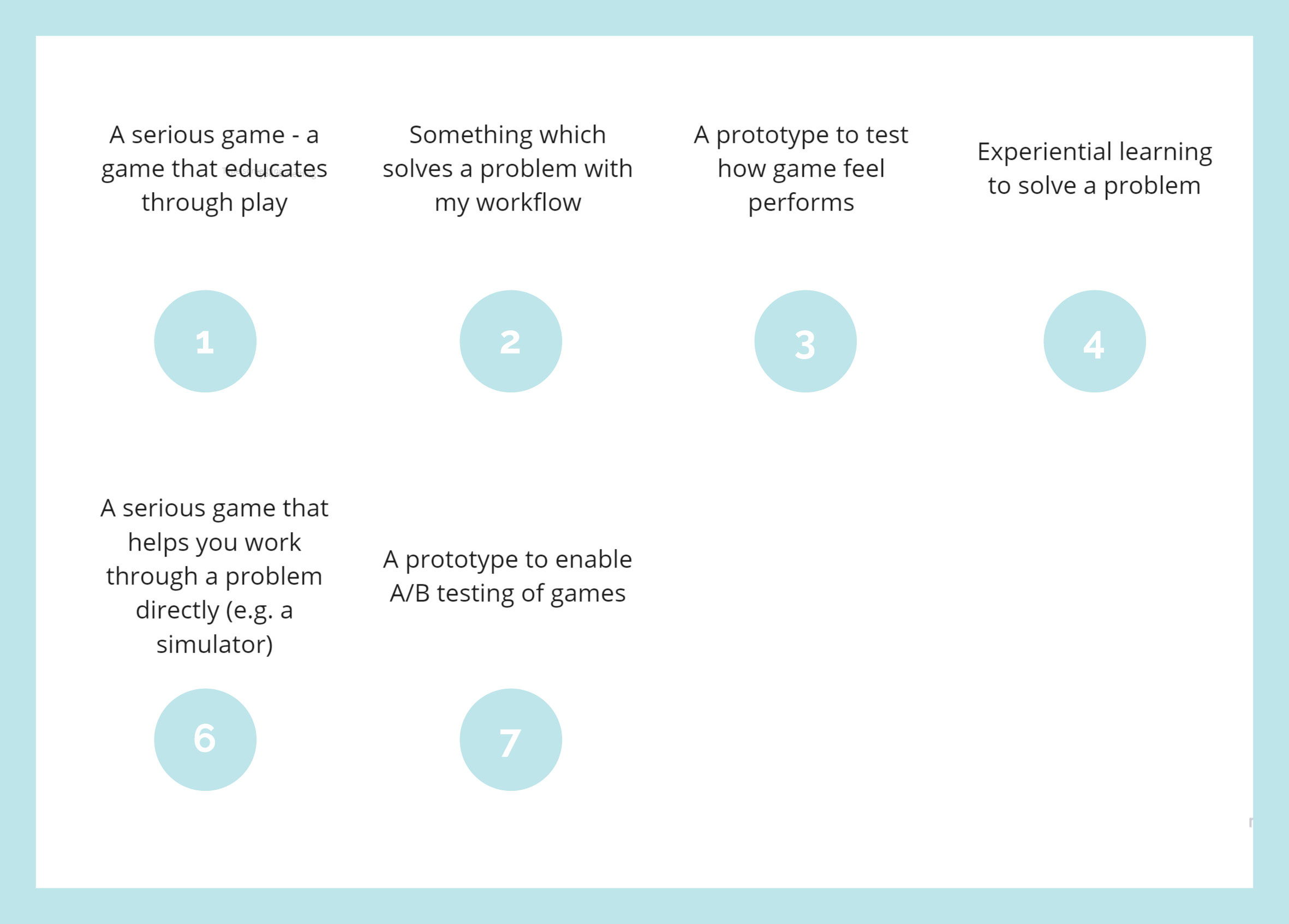
I started by feeding my goals into the theme. What problem could I solve in my daily life, which also allows me to build on my research and learning goals?
Two clear paths emerged.
Path 1. Creating a serious game prototype
Serious Games is a field I have worked extensively in since 2016, primarily in gamification products, and as such further development here is a constant goal for me.
In the reveal webinar, one of my peers brought up how games are problem-solving by design and that they are more of an escape than serious, which got me thinking about problem-solving in games. How do we even look to solve a wider problem beyond a game's core mechanic?
This is where the term "Serious Games" comes in. Serious Games as a term currently has no consensus (Kowert and Quandt, 2020) and is known as various titles, such as Games for Change (Home Page - Games For Change, n.d.). Broadly defined, however, serious games are:
"video games aimed toward problem-solving rather than entertainment. They use the same media as video games aimed at recreational play. However, serious games can help learners gain a good understanding of a specific topic and sustain the acquisition of complex competencies" (Pilote and Chiniara, 2019)
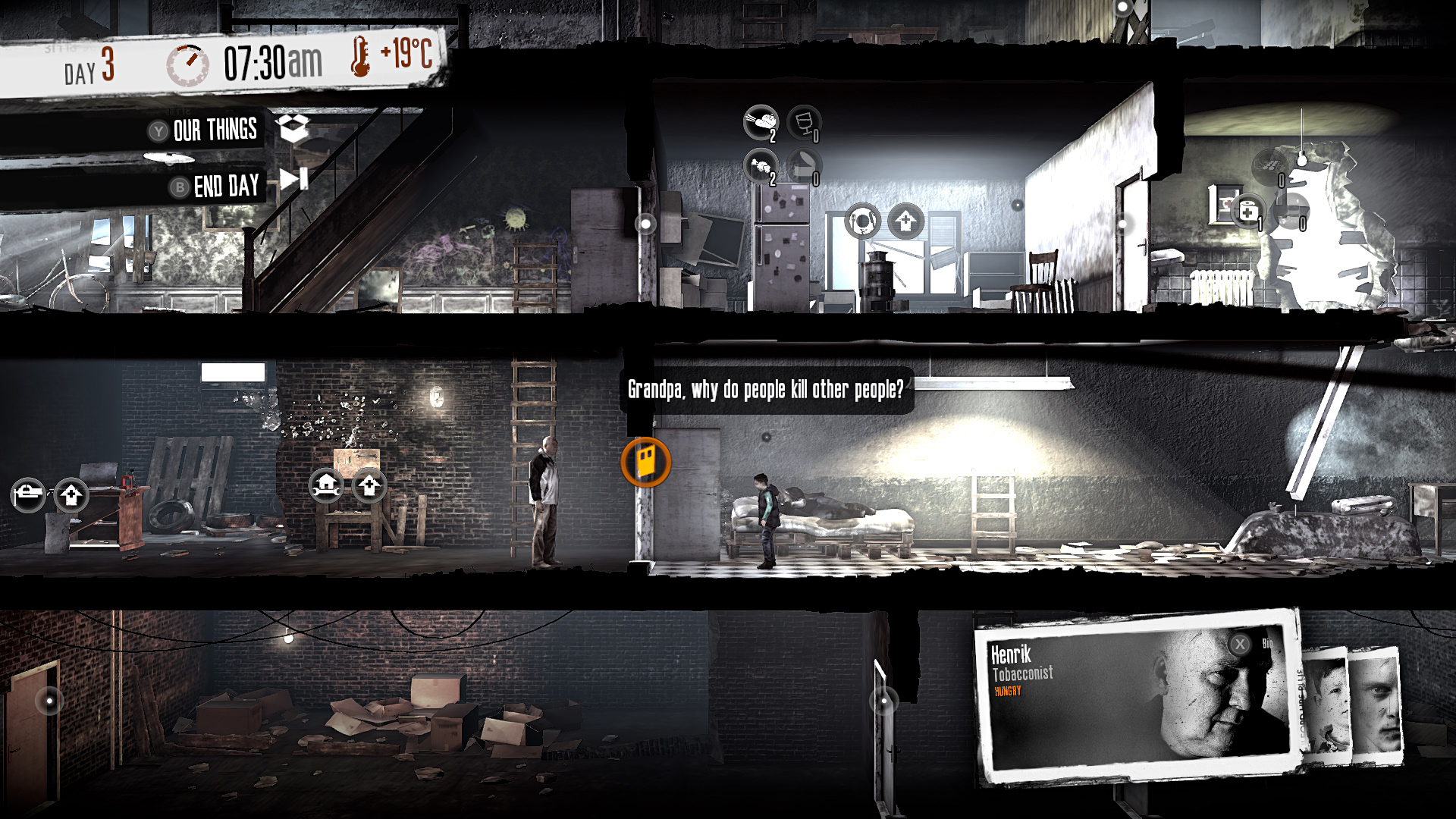
A good example of a serious game that educates directly would be a simulation game. At the same time, serious games can also work as ways to inform on a topic, for example, This War of Mine (11 bit Studios. 2014), which forces the player to think about the hard decisions civilians may be faced with in wartime.
So path 1. is clearly compatible with the idea of a serious game. Making a game that solves a real-world problem.
Pros and cons of this path
| Pros | Cons |
| Opportunity to develop in the field I work in. | It could be unrealistic to deliver in the 2 days build time I have. |
| Opportunity to build on the goal of developing game feel further. | Limited opportunity to refine workflow. |
| Opportunity to playtest. | Limited opportunity to deep dive into version control further. |
| Opportunity to improve project management. |
Path 2. A prototype that solves a problem with my workflow
Rapid ideation one, version control and research weeks all repeatedly picked up on one goal that I wanted to work on, refining my workflow.
In August, I'll be starting a new Game Developer role working in serious games, and as part of the first project sprints, rapid prototyping and testing will be absolutely crucial.
So would there be something I could work on in my workflow that could further my educational goals and feed directly into my professional work? A few issues I came up against in RI1 included:
- Build runs in Unity, taking over my computer and slowing down progress
- Deployment
- Not having a decent initial template (or boilerplate) set up with packages that I use regularly and the GUI set up that suits best.
So there is scope and opportunity here to interpret "Solving a problem in your daily life" as developing something that is an obstacle to faster and smoother prototyping itself.
Pros and cons of this path
| Pros | Cons |
| Opportunity to improve workflow | No direct progression in serious games (although there is the secondary benefit of rapid deployment) |
| Opportunity to build something I can use in professional contexts. | No progression in-game feel. |
| Opportunity to delve deeper into version control tools in gaming. | No opportunity to playtest. |
| Opportunity to improve project management. | |
| Opportunity to create a tool to aid playtesting faster in future. |
Comparing the paths and choosing... Path Two.
Although producing a serious game is exactly what I want to do, I feel it may be better saved for a longer project run where I can delve further in, and playtesting can be a part of that and future projects anyway. Watch this space.
On the other hand, producing something that drastically speeds up my workflow both on this course and in a professional environment and allows me to deploy rapidly and test was too good an opportunity to pass up. This path gives me the chance to improve my ability and knowledge in core elements of Unity, and deployment, both areas I have identified as weaker elements that need improvement.
In addition, I produced a game artefact in Rapid Ideation One with lots of emphasis on visuals and feel, so working on something more technical adds more breadth to my learning journey.
The prototype brief
The ideation process up to this point landed me in a pretty focused zone already. I wanted to improve my workflow, create a tool I could use professionally, delve deeper into version control options in gaming/unity, and improve my project management.
Even better, if I can design something that later helps efficiently playtest, I'd have a tool I can continue to develop and use.
So my final brief:
Develop a prototype pipeline structure that enables the fast production and deployment of prototypes in Unity for user testing. It should ideally take the build process away from my development PC, and automatically deploy to a web URL that can easily be configured.
The development process + result
When thinking about a pipeline structure like this, one word is key: automation.
The purpose of a pipeline such as this is to take the heavy lifting away from both my development machine and my own development time. This allows me to produce prototypes that are ready to test faster. So I had to break down the elements necessary.
| Element | Possible solution |
| A Unity template to kick start projects. |
|
| A build farm to build Unity projects remotely |
|
| Automatic deployment on build (Must be possible to configure the remote URL easily) |
|
A Unity Template
I researched ways of creating a configurable template that could easily be selected from unity hub as a new project. However, there were only fairly hacky solutions to this, none of which I was comfortable would be sustainable vs simply creating a Unity project I could duplicate.
On reflection, this section of the prototype was probably the least important at this stage. It's easy to refine a reusable template as I learn what's needed for each project. The build and deployment process is far more useful at this stage.
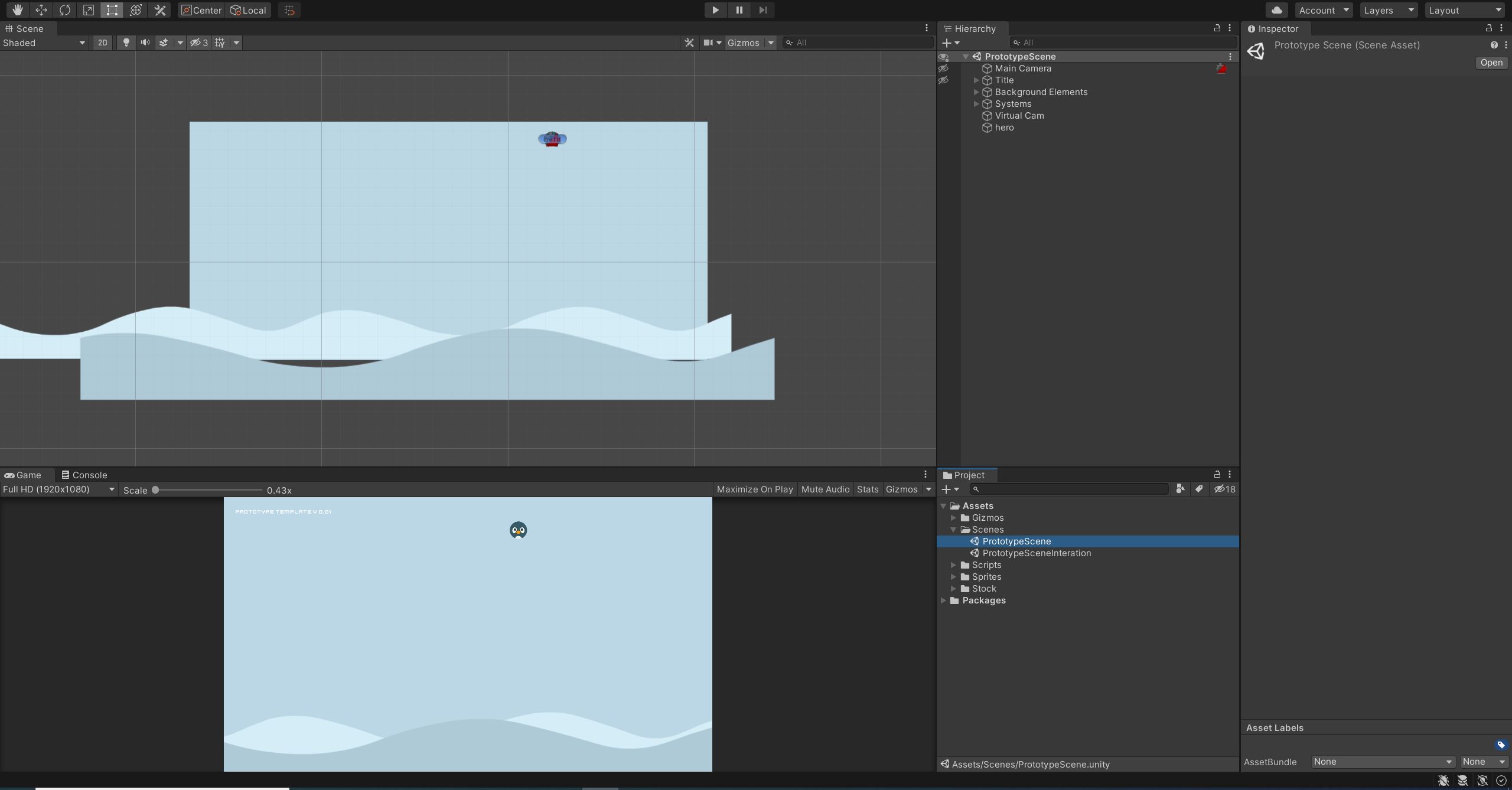
But for the sake of the prototype, I looked back through my unity tutorials and previous projects and picked out my most used packages and setups to include (figure 4).
This prototype is all about designing a pipeline that makes rapid prototyping and testing of different iterations possible. With that in mind, I made a second branch with a slightly altered template. Some cool new nighttime colours and a particle field for a change of atmosphere (figure 5).
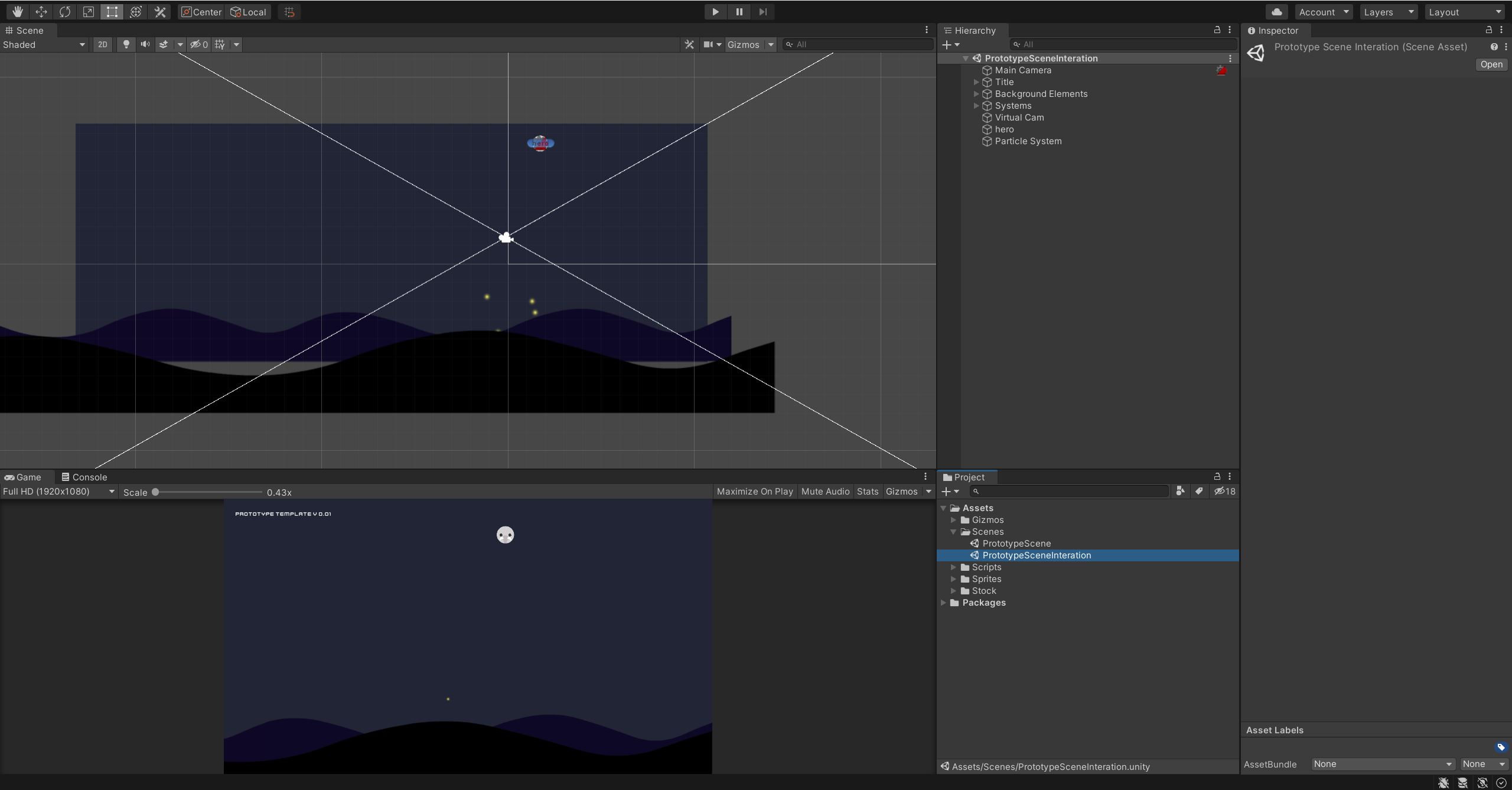
All set up for the next stage.
Remote build and auto-deployment
What does this actually mean? One problem I found with my workflow in the first session was that I wanted to test the game in a real built environment, but doing so meant losing my processor for 5-10 minutes. That really adds up the more you iterate.
So a build (or compile) farm is the solution to that. A remote server/machine (or network of servers) is set up to take on the heavy lifting of building your project while you continue to work.
I researched a few options, including the idea of setting up a second machine on my network that builds on a regular schedule, but that wasn't viable at this stage.
There are also paid options such as Unity's Cloud Build (Services - Cloud Build - Unity, n.d.), which looks like a great solution for larger productions but is somewhat costly for educational or small build prototyping purposes.
The solution I found fit perfectly with the version control week's challenge of setting up a Github Repo - A combination of Game CI (GameCI, n.d.) and Github Actions (Features • GitHub Actions, n.d.). Working through a YouTube tutorial (LP Games, 2021) helped me get things running.
Continuous Integration (or CI) is the process of automating the integration of code changes into a piece of software (What is Continuous Integration | Atlassian, n.d.). Game CI enables you to build your games using Github Actions automatically, and even better, it allows the running of Unity tests beforehand. This not only fit my requirement for remote Unity builds but also allows auto-testing to make sure merges don't break things first. Once set up, I push my branch to GitHub, and the CI begins (Figure 5).
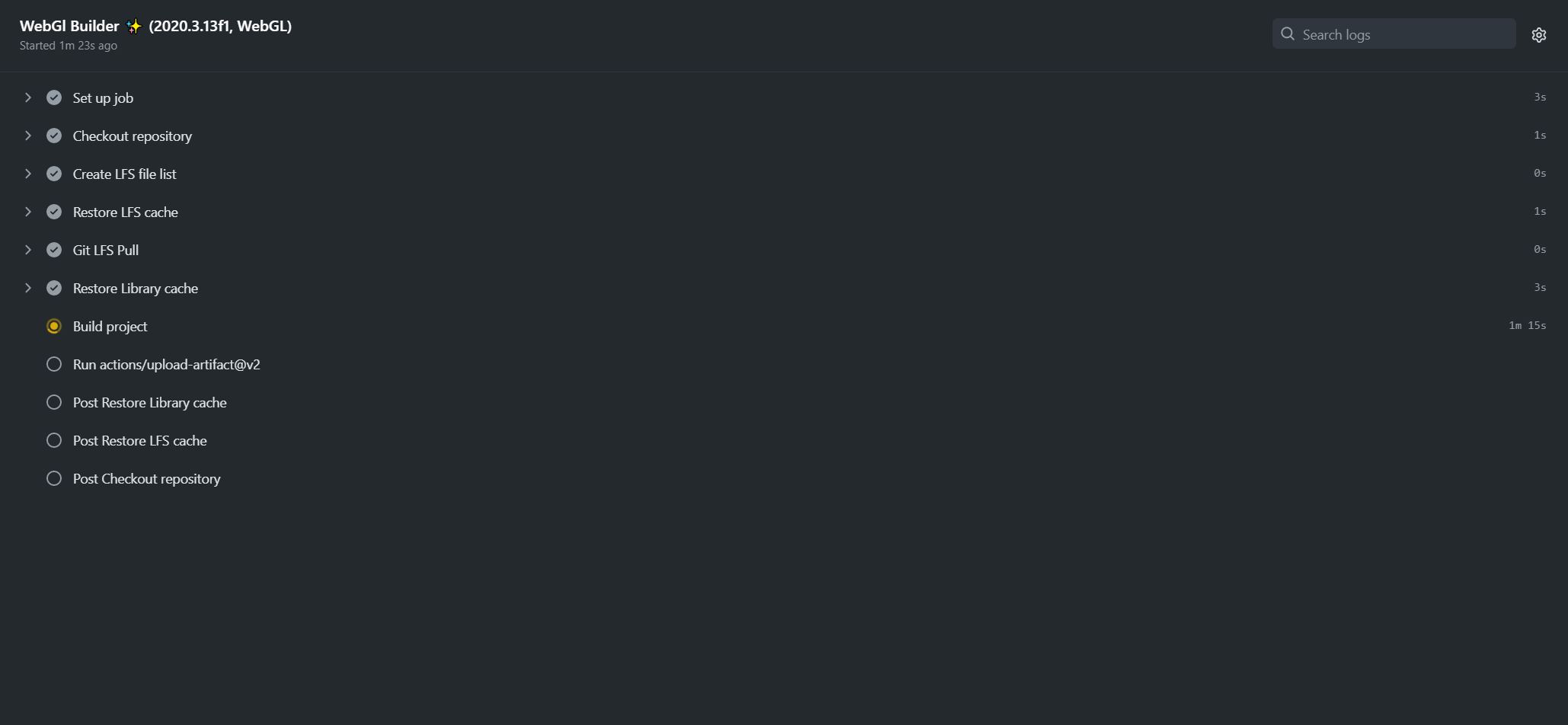
I also added an auto-deployment package and a second Github Actions job to deploy the built files to my webserver (Figure 6).
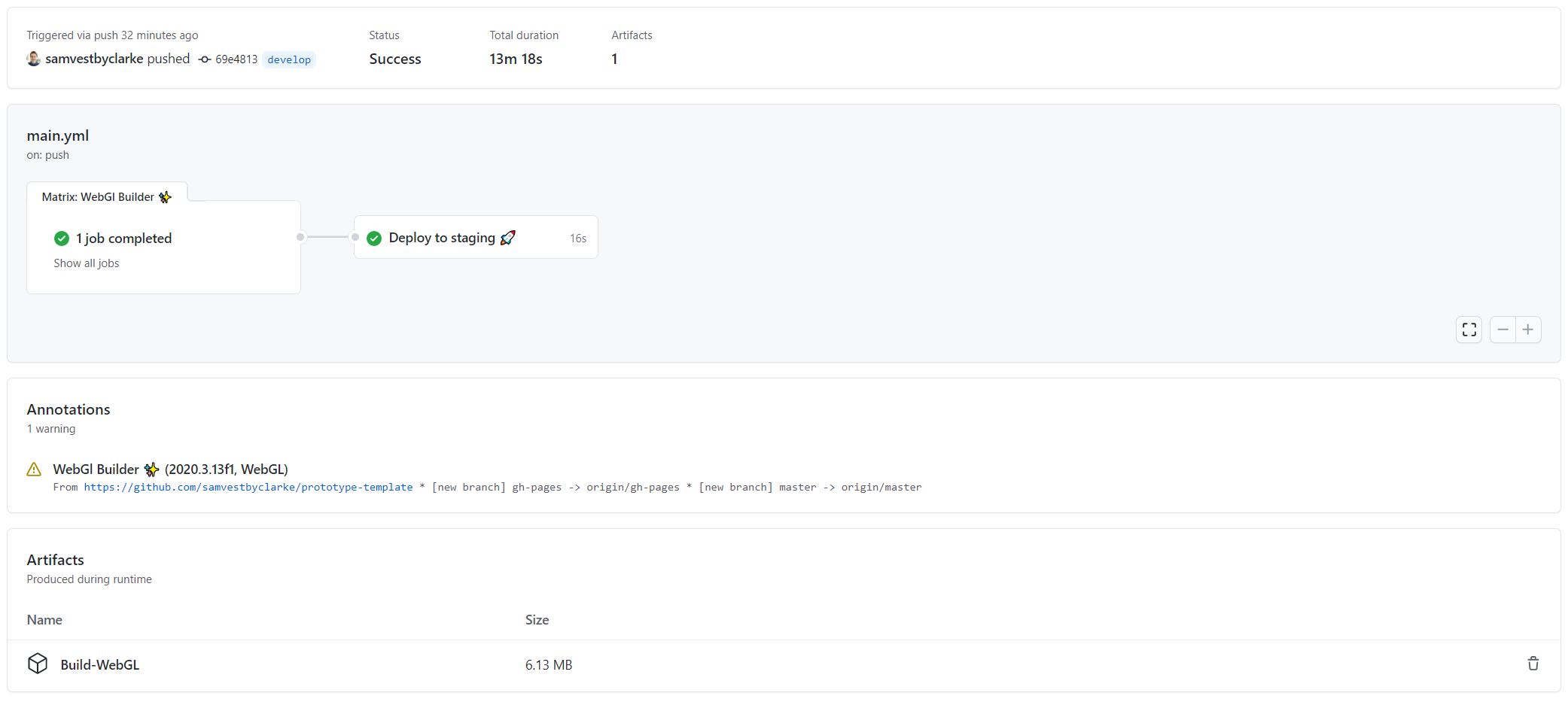
The full Actions config file can be found in my Github repo.
Bringing it together for rapid prototyping and testing
So there was one final piece of the pipeline to put together. A way to easily configure the version I want to deploy and automatically send that to a generated URL on my staging server.
This is useful because if I want to test two similar versions of something (as I have set up already for this project), I can quickly push them both to unique URLs.
I wrote a custom gulp.js file to generate the .yml template for Github actions based on a few parameters to handle this part of the process. The parameters are name and version and generate a URL built from these e.g.
All that is then left to do is run a few commands in the command line after saving my Unity project:
gulp config
git ca "My prototype ready for deployment"
git push origin develop
And from there, my completed prototype process kicks off:
(Vestby-Clarke, 2021)
Summary
This was an interesting one for me. I started with the firm intention of producing a serious game. By understanding time limitations and assessing that I could build something more useful as a prototype for both the remainder of my MA and my professional work, I ended up producing a very technical driven pipeline tool.
Even though I ended up building a tool, my rapid ideation process was super valuable as it took me through research (including finally some peer-reviewed work) covering serious games and simulation and how that relates to problem-solving, and through that and conversations with my cohort made me question what problem-solving in gaming actually is.
What's most interesting to me here is that serious gaming is somewhat undefined still and ripe for study, experimentation and development.
One aspect of this session that I was disappointed with was again not working with someone else. That meant my two artefacts were quite insularly driven, focused perhaps a bit too much on what I need and what I like. My artefact also wasn't suited to playtest, which I had wanted to integrate into this session.
That leads me neatly to my smart goals review for this session.
What do I want to work on?
- Trialling out my new pipeline on the next game I develop
- Integrate playtesting into the next artefact/game I produce on the course
- A focus on serious gaming for the next game I produce
List of figures
Figure 1. Vestby-Clarke, S., 2021. Rapid Ideation 2 - My Continuous Integration Pipeline prototype offloads Unity Building and allows fast deployment to the web from the command line. [image] Available at: <http://indie.samvestbyclarke.com/bl-content/uploads/pages/9c136cb469a2b978c4d2ccf992721822/rapid-ideation-2-full.gif> [Accessed 29 July 2021].
Figure 2. Vestby-Clarke, S., 2021. Ideation brainstorming ideas. [image] Available at: <http://indie.samvestbyclarke.com/bl-content/uploads/pages/9c136cb469a2b978c4d2ccf992721822/ideationbrainstorming01.jpg> [Accessed 29 July 2021].
Figure 3. 11 bit studios S.A., n.d. This War of Mine TWOM_TLO_XBONE_06. [image] Available at: <https://www.thiswarofmine.com/wp-content/uploads/2015/08/TWoM_TLO_XBONE_06.jpg> [Accessed 29 July 2021].
Figure 4. Vestby-Clarke, S., 2021. A reusable template in Unity. [image] Available at: <https://indie.samvestbyclarke.com/bl-content/uploads/pages/9c136cb469a2b978c4d2ccf992721822/unity-prototype-template.jpg> [Accessed 29 July 2021].
Figure 5. Vestby-Clarke, S., 2021. Iteration on my Unity template. [image] Available at: <https://indie.samvestbyclarke.com/bl-content/uploads/pages/9c136cb469a2b978c4d2ccf992721822/unity-prototype-template-iteration.jpg> [Accessed 29 July 2021].
Figure 6. Vestby-Clarke, S., 2021. The Game CI WebGL job running which builds the game remotely. [image] Available at: <https://indie.samvestbyclarke.com/bl-content/uploads/pages/9c136cb469a2b978c4d2ccf992721822/github-actions.jpg> [Accessed 29 July 2021].
Figure 7. Vestby-Clarke, S., 2021. Both WebGL Builder and Deployment jobs running in Github Actions. [image] Available at: <https://indie.samvestbyclarke.com/bl-content/uploads/pages/9c136cb469a2b978c4d2ccf992721822/github-actions-build-and-deploy.jpg> [Accessed 29 July 2021].
References
Atlassian. n.d. What is Continuous Integration | Atlassian. [online] Available at: <https://www.atlassian.com/continuous-delivery/continuous-integration> [Accessed 29 July 2021].
11 bit Studios. 2014. This War of Mine. [Game] Microsoft Windows, OS X, Linux, Android, iOS, PlayStation 4, Xbox One, Nintendo Switch. Poland: 11 bit studios S.A.
Game.ci. n.d. GameCI. [online] Available at: <https://game.ci/> [Accessed 29 July 2021].
Games For Change. n.d. Home Page - Games For Change. [online] Available at: <https://www.gamesforchange.org/> [Accessed 29 July 2021].
GitHub. n.d. Features • GitHub Actions. [online] Available at: <https://github.com/features/actions> [Accessed 29 July 2021].
Kowert, R. and Quandt, T., 2020. The Video Game Debate 2: Revisiting the Physical, Social, and Psychological Effects of Video Games. 1st ed. Routledge, p.21.
LP Games, 2021. How to build your Unity game on Github with Game CI. [image] Available at: <https://www.youtube.com/watch?v=M2BZr02uai0> [Accessed 29 July 2021].
Pilote, B. and Chiniara, G., 2019. Clinical Simulation (Second Edition). 2nd ed. Academic Press, pp.17-32.
Unity. n.d. Services - Cloud Build - Unity. [online] Available at: <https://unity3d.com/unity/features/cloud-build> [Accessed 29 July 2021].
Vestby-Clarke, S., 2021. Week 5 - Rapid Ideation Part 02 - The Artefact | Sam Vestby-Clarke. [online] Indie.samvestbyclarke.com. Available at: <http://indie.samvestbyclarke.com/week-5-rapid-ideation-part-02-the-artefact> [Accessed 29 July 2021].
Vestby-Clarke, S., 2021. Week 5 - Reflection | Sam Vestby-Clarke. [online] Indie.samvestbyclarke.com. Available at: <http://indie.samvestbyclarke.com/week-5-reflection> [Accessed 29 July 2021].
Vestby-Clarke, S., 2021. Week 7 - Version Control | Sam Vestby-Clarke. [online] Indie.samvestbyclarke.com. Available at: <http://indie.samvestbyclarke.com/week-7-version-control> [Accessed 29 July 2021].
Vestby-Clarke, S., 2021. Week 8: Research & Ethics | Sam Vestby-Clarke. [online] Indie.samvestbyclarke.com. Available at: <http://indie.samvestbyclarke.com/week-8-research> [Accessed 29 July 2021].
Vestby-Clarke, S., 2021. rapid-ideation-2-op. [video] Available at: <https://indie.samvestbyclarke.com/weeks-8-9-rapid-ideation-session-2> [Accessed 29 July 2021].